
一、conflicting types for ‘copy_file_range’
./…/misc/create_inode.c:395:18: error: conflicting types for ‘copy_file_range’
static errcode_t copy_file_range(ext2_filsys fs, int fd, ext2_file_t e2_file,
^
In file included from ./…/misc/create_inode.c:19:0:
/usr/include/unistd.h:1110:9: note: previous declaration of ‘copy_file_range’ was here
ssize_t copy_file_range (int __infd, __off64_t *__pinoff,
^
解决办法:
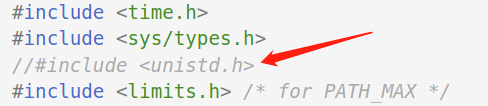
buildroot-2017.02.3/output/build/host-e2fsprogs-1.43.3/misc/create_inode.c
屏蔽掉 #include <unistd.h>
二、openwrt 编译时报SOURCE_DATE_EPOCH must expand to a non-negative integer less than or equal to 25340230
log:
mkyaffs2image.c: In function 'main':
mkyaffs2image.c:470:6: error: environment variable SOURCE_DATE_EPOCH must expand to a non-negative integer less than or equal to 253402300799
fprintf(stderr,"mkyaffs2image: image building tool for YAFFS2 built "__DAT
solution:
三、解决openssl1.1.0导致ssl1.0.版本的代码出错问题
编译uboot时,错误打印信息:
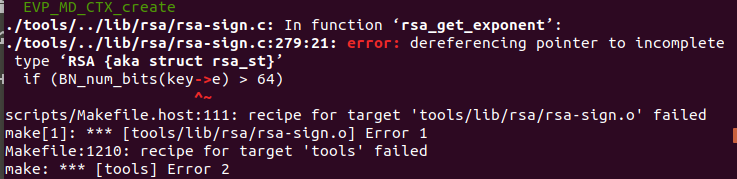
lib/rsa/rsa-sign.c:279:21: error: dereferencing pointer to incomplete type 'RSA {aka struct rsa_st}'
if (BN_num_bits(key->e) > 64)
^~
scripts/Makefile.host:134: recipe for target 'tools/lib/rsa/rsa-sign.o' failed
通过降级openssl解决
sudo apt install libssl1.0-dev
四、遇到问题error: dereferencing pointer to incomplete type 'RSA {aka struct rsa_st}'
下载如下补丁
https://github.com/openwrt/openwrt/commit/70b104f98c0657323b28fce140b73a94bf3eb756#diff-ad001f3a51a1d957d5013650f14df0cb
保存为
tools/mkimage/patches/210-openssl-1.1.x-compat.patch
五、模块 mkimage(u-boot-2014.10) 出错
原因
OpenSSL版本是1.1x,OpenSSL 1.1.x对一些API做了改动,因此出现错误信息。
解决方法
参考 tools: mkimage: fix build with OpenSSL 1.1.x (FS#182) · openwrt/openwrt@70b104f · GitHub
在tools/mkimage/patches/目录下wget210-openssl-1.1.x-compat.patch
如下: