
问题现象:
SDK/Vitis(Eclipse)出现“You are opening a large file.Scalability mode has been turned on for this editor to help improve performance. Do you want to change scalability settings now?”
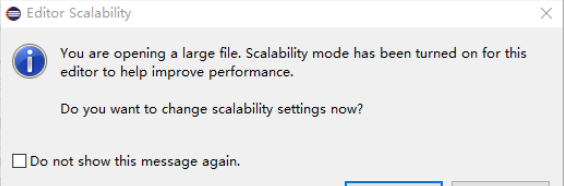
大概意思:我们打开了一个大文件,编辑器自动启用了可伸缩性模式,以帮助提高性能,然后问你现在是否需要设置可伸缩性模式?
出现的原因:SDK/Vitis(Eclipse)首次编辑大于5000行(默认)代码以上的文件时,会提示为了提高性能,已进入Scalabilitys模式,将关闭代码定义跳转功能以提高性能,那么之后再编辑大代码将不能使用代码定义跳转功能。
默认情况下是5000行。
解决方案:
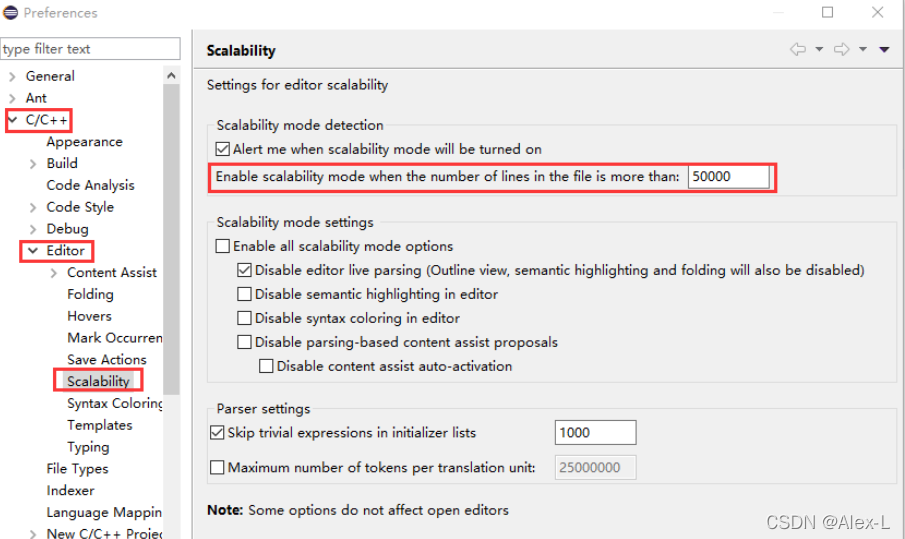
【Windows】 -> 【Perferences】 -> 【C/C++】 -> 【Editor】 -> 【Scalabilitys】,在右边的【Enable scalability mode when thr number of lines in the file is more than】:栏后填上【20000】或者【50000】,具体根据自己的代码来调整就好。
参考链接:https://blog.csdn.net/ReCclay/article/details/108246535 ;