
Windows
- 如何手工调整有线和无线网络的网络优先事项
Ubuntu18
- Ubuntu双重网络卡的内部和外部网络优先事项
查看配置
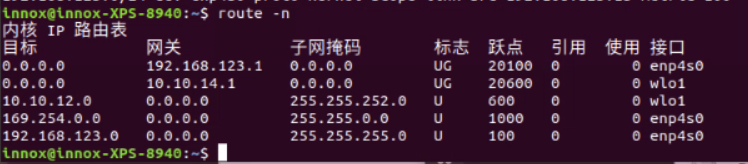
我的无线网络卡与外联网连接,需要互联网接入,因此得到更优先的考虑;无线网络卡部分与内联网连接,不需要访问,因此给予低度优先。
目前的配置:
- 有线网卡:
10.10.12.0公尺等值为600。 - 无线网卡:
192.168.123.0最多100米
修改配置
innox@innox-XPS-8940:~$
ip route show
default via 192.168.123.1 dev enp4s0 proto static metric 20100
default via 10.10.14.1 dev wlo1 proto dhcp metric 20600
10.10.12.0/22 dev wlo1 proto kernel scope link src 10.10.14.219 metric 600
169.254.0.0/16 dev enp4s0 scope link metric 1000
192.168.123.0/24 dev enp4s0 proto kernel scope link src 192.168.123.13 metric 100
我的有线卡部分如下:
无线网卡部分为:
只需要将无线网卡的metric改为90即可解决问题:
删除
metric=600的网卡配置:添加
metric=90的网卡配置: